
Recently, my current project has faced some loading issue with mongodb, to be specific, documentdb from AWS. We have mid-level instance and a lot of collection for data seperation purpose. For some of collections, it store more than millions data.
Our data structure like this:
type Course struct {
    ClassType int
    Prerequirement []*Course
    Teacher string // should be a Teach but for simplicity using string here.
    BuildNumber int

}

type Student struct {
    Grade int
    AdmittedAt time.Time
    StartedAt time.Time
    GraduationTime time.Time
    CoursesJoined []*Course
}
The data structure is just a mock, to clarify the function of indexes, we will consider some scenario later.
Before we jump into the index, we should know the basic index concept and when/where/how to create an index which is an index strategy.
I will skip when and where here, but want to emphasize ‘How to create an effective index’
The ESR (Equality, Sort, Range) Rule
Equality
“Equality” refers to an exact match on a single value. The following exact match queries scan the cars collection for documents whose model field exactly matches Cordoba.
db.cars.find( { model: "Cordoba" } )db.cars.find( { model: { $eq: "Cordoba" } } )Index searches make efficient use of exact matches to limit the number of documents that need to be examined to satisfy a query. Place fields that require exact matches first in your index.
An index may have multiple keys for queries with exact matches. The index keys for equality matches can appear in any order. However, to satisfy an equality match with the index, all of the index keys for exact matches must come before any other index fields. MongoDB’s search algorithm eliminates any need to arrange the exact match fields in a particular order.
Exact matches should be selective. To reduce the number of index keys scanned, ensure equality tests eliminate at least 90% of possible document matches.
Sort
“Sort” determines the order for results. Sort follows equality matches because the equality matches reduce the number of documents that need to be sorted. Sorting after the equality matches also allows MongoDB to do a non-blocking sort.
An index can support sort operations when the query fields are a subset of the index keys. Sort operations on a subset of the index keys are only supported if the query includes equality conditions for all of the prefix keys that precede the sort keys. For more information see: Sort and Non-prefix Subset of an Index.
The following example queries the cars collection. The output is sorted by model:
db.cars.find( { manufacturer: "GM" } ).sort( { model: 1 } )To improve query performance, create an index on the manufacturer and model fields:
db.cars.createIndex( { manufacturer: 1, model: 1 } )manufactureris the first key because it is an equality match.modelis indexed in the same order (1) as the query.
Range
“Range” filters scan fields. The scan doesn’t require an exact match, which means range filters are loosely bound to index keys. To improve query efficiency, make the range bounds as tight as possible and use equality matches to limit the number of documents that must be scanned.
Range filters resemble the following:
db.cars.find( { price: { $gte: 15000} } )db.cars.find( { age: { $lt: 10 } } )db.cars.find( { priorAccidents: { $ne: null } } )MongoDB cannot do an index sort on the results of a range filter. Place the range filter after the sort predicate so MongoDB can use a non-blocking index sort. For more information on blocking sorts, see cursor.allowDiskUse().
Please keep these three words in your mind until you find a job that completely is irrelated to development, of course, until you win the power ball as well.
So we can start to think about several cases:
We want to find all students that are in Grade 1 and admitted in past 6 weeks, then sorted by start date descending.
at this case, we know Equality is grade, and Sort is the start time, the time range is based on admitted time, so we can easily create an index
{grade:1, admitted_at: -1, started_at:-1}But the requirement changed a lot. For some reason, the principal wants to know all school students instead of Grade 1, because of the index prefix mechanism in MongoDB (https://www.mongodb.com/docs/manual/core/index-compound/#prefixes) without grade, this index won’t be hit when searching only by admitted time and start time.
In this case, we may want to change the index to
{admitted_at: -1, started_at:-1, grade:1}. But for the same reason, it will request every query need to contain a prefix to take advantage of the index.
We want to find all students that have Type A course and That course’s teacher is Weihao and admitted in past 6 weeks, then sorted by start date descending.
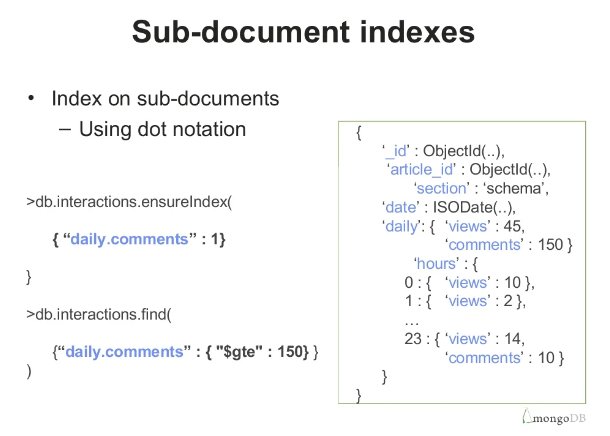
In this case, cause we have a subdocument in our data structure, we need to create an index for the subdocument as well. So the index will looks like
{courses_joined.class_type:1, courses_joined.teacher:1, admited_at:-1, started_at:-1}We still try to use a compound index to fulfill the requirement, which is good for extensibility but also bad for extensibility. Imagine one more scenario, what if someday the product manager asks you when the department of education has issued a new law that doesn’t allow searching students much specific. So you have to change the AND relation between course_joined.class_type and course_joined.teacher to OR relation. Then you find out the index is not hitting anymore as OR aggregation requires both fields have an independent index.
In this case, we should create multiple indexes and use MongoDB index intersection
{admited_at:-1, started_at:-1}
{courses_joined.class_type:1}
{courses_joined.teacher:1}
Other MongoDB article: